Album list panel 2.2.0 released
• 2 min read
Album list panel is an add-on for the Columns UI component for the foobar2000 audio player on Windows. It allows you to browse your foobar2000 media library as a tree. The component is a fork of the same Album List that comes with foobar2000, providing a panel version that can be added to a Columns UI layout.
Here’s a summary of the changes in Album list panel 2.2.0, released today.
Autoplaylist creation
You can now create automatically updating playlists – called autoplaylists – from one or more items in the tree and any active filter query. Such autoplaylists automatically update whenever the content of your media library changes.
To create an autoplaylist, right-click on one or more items in an instance of the panel in your layout and select ‘Create autoplaylist’ from the context menu:
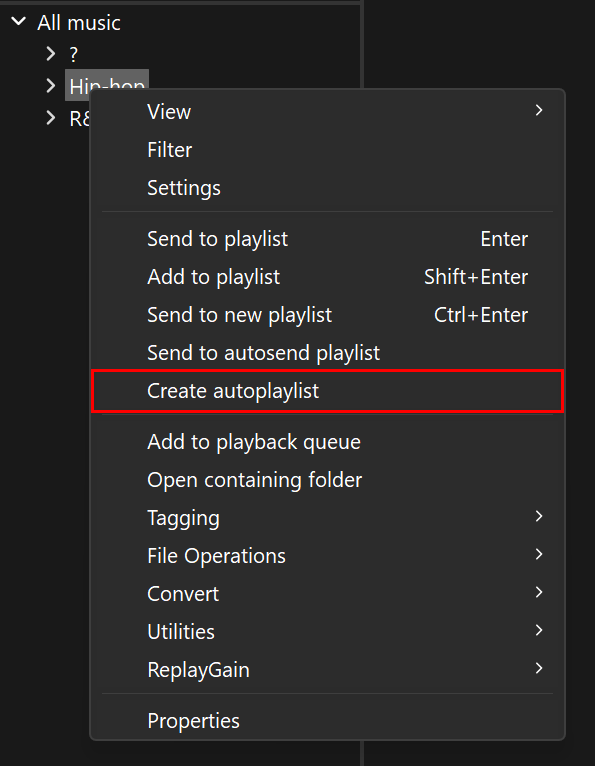
The new autoplaylist will be created after any existing playlists and will be named after the items that were selected.
You can edit properties of the autoplaylist later by right-clicking on the created playlist in the playlist switcher, the playlist tabs or another playlist manager and selecting ‘Album list panel properties’1.
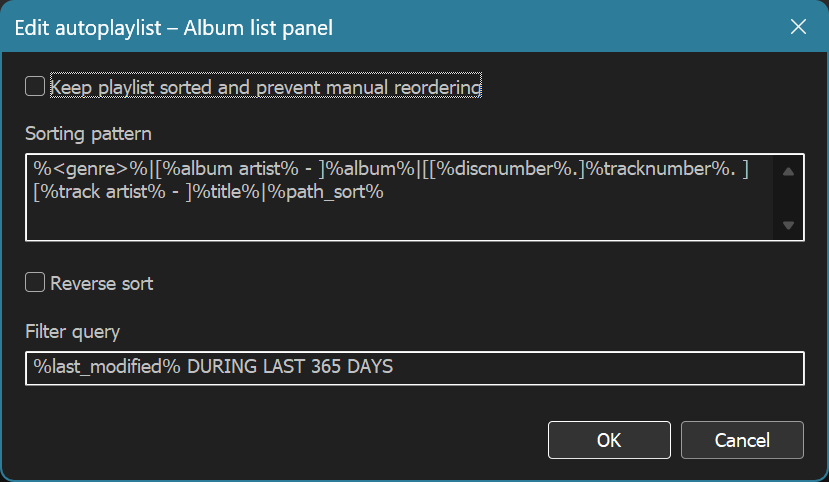
You’re able to make the playlist sort itself automatically, adjust how items are sorted and edit any filter query. (If ‘Keep playlist sorted and prevent manual reordering’ is disabled, the configured sorting pattern is still used for any items added to the playlist at a later date.)
An updated compiler and removed support for Windows 7, 8 and 8.1
In line with recent versions of Columns UI, Album list panel is now built using Visual Studio 2026, toolset version 14.51 (an upgrade from Visual Studio 2022, toolset version 14.43). As a result, Album list panel no longer works on Windows 7, 8 and 8.1.
If you’re still on Windows 7, 8 or 8.1, you should remain on Album list panel 2.1.0 (or an older version).
Other changes
Details of changes between pre-release versions are available on the releases page on GitHub.
How to update
If you currently have Album list panel installed, you can update to the latest version using the Help › Check for updated components command in foobar2000.
If you have foobar2000 and Columns UI installed and want to add Album list panel, download Album list panel from the Album list panel page, open foobar2000, navigate to Preferences › Components, click the Install… button and select the downloaded file. Alternatively, if file associations are set up, you can simply double-click the downloaded component package. Once Album list panel is installed, you’ll need to add it to your layout either using Live (layout) editing or from Preferences › Display › Columns UI › Layout.
Footnotes
The name of the context menu item may vary in third-party playlist managers. ↩