Columns UI 3.6.0 released
• 2 min read
Columns UI is an alternative UI for the foobar2000 audio player on Windows. Columns UI is written in C++, uses the Win32 API and is open source on GitHub.
Here’s a summary of the most notable additions and changes in Columns UI 3.6.0, released today.
Autoscroll in built-in panels
The playlist view, playlist switcher, Filter panel, Item details and Item properties panels all now support auto-scrolling using the middle mouse button:
There are two ways of using autoscroll. You can click the middle button to enter autoscroll mode, move the mouse to scroll and then click the middle button again to exit autoscroll mode. Alternatively, you can press and hold down the middle mouse button, move the mouse to scroll and then release the middle button when done.
Note that autoscroll will be unavailable if a different middle-click action has been assigned in Preferences for the relevant panel.
Spectrum analyser enhancements
The built-in spectrum analyser visualisation now has a solid bars appearance option:

The visualisation also now has an option to smooth values, useful for large visualisation widths where low frequency resolution becomes more noticeable:
Without smoothing

With smoothing

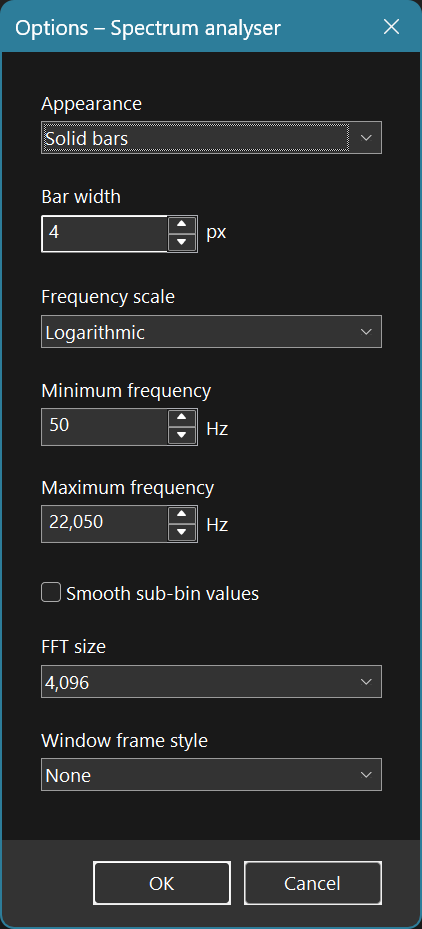
Additionally, you can now customise:
- the width of bars (in the bars appearance modes)
- the fast Fourier transform (FFT) size, allowing you to choose between a more responsive visualisation or one with more frequency detail
- the minimum and maximum frequency on the x-axis
The new options are all available from the spectrum analyser options dialogue:
Manually reload playlist view artwork
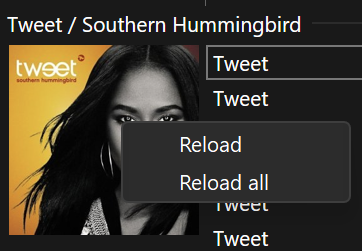
When right-clicking on artwork in the playlist view, a context menu with commands to reload that image or all artwork in the playlist is now shown:
%playlist_name% in playlist view grouping scripts
The %playlist_name% field is now available in playlist view grouping scripts. This can be used with functions such as $if() to add conditional logic based on the playlist name.
For example, the group heading text can be varied based on the playlist name. Since the grouping level can be omitted by outputting an empty string, this also provides an alternative to the existing playlist filters.
Other changes
There were several other smaller improvements and bug fixes in Columns UI 3.6.0 – see the release notes from version 3.6.0-beta.1 onwards for full details.
How to update
If you currently have Columns UI installed, you can update to the latest version using the Help › Check for updated components command in foobar2000.
If you have foobar2000 installed and want to add Columns UI to it, download Columns UI from the Columns UI page, open foobar2000, navigate to Preferences › Components, click the Install… button and select the downloaded file. Alternatively, if file associations are set up, you can simply double-click the downloaded component package.
(And if you don’t have foobar2000 at all, you can download it from the foobar2000 downloads page.)